
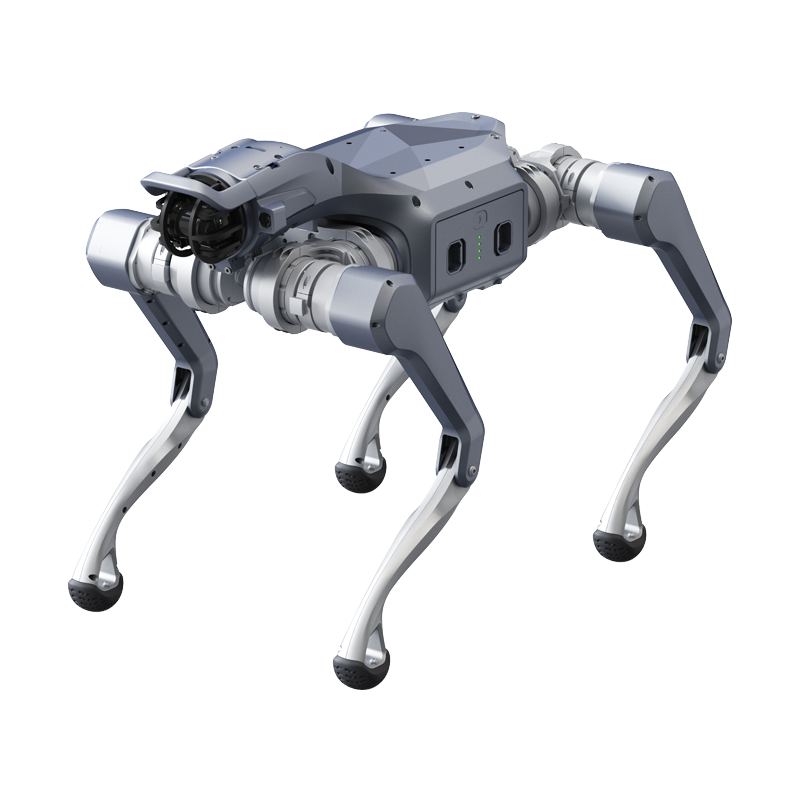
The Unitree Go2 series is the most popular quadruped robot family on the market, and for good reason. A base platform that weighs approx. 15 kg, runs approx. 3.5 m/s at top speed, carries the Unitree 4D LiDAR L2 (360°×96°) for perception, and moves on 12 joint motors gives you a remarkable amount of robot for the money. But the Go2 name covers four very different machines, from a $3,790 consumer robot to enterprise inspection builds at $22,705. Buy the wrong one and you either overspend on capability you will never use or hit a wall the first time you try to load your own code.
This guide compares every member of the Go2 family sold through our Unitree collection, explains who each model is actually for, and maps the accessory ecosystem and upgrade paths so you can buy once and buy right. All prices are current 2026 US pricing, subject to change: contact us for a formal quote.
The Go2 Family at a Glance
| Robot | Model | 2026 US Price | Best For | Key Differentiator |
|---|---|---|---|---|
 |
Go2 Pro | $3,790 | Enthusiasts, demos, STEM outreach | Lowest-cost entry with 4D LiDAR L2 and app control |
 |
Go2 X | $7,600 | Advanced users who outgrow the Pro | Faster, higher payload, limited development access |
 |
Go2 Edu | From $11,190 (configs to $19,430) | University labs, R&D teams | Full SDK and ROS support for secondary development |
 |
Go2 Ent | From $11,305 (Ent GAS) to $22,705 (Ent MPTZ) | Commercial inspection teams | Enterprise variants configured around inspection payloads |
Pricing is subject to change. Contact us for a formal quote on any configuration.
Unitree Go2 Pro: The Entry Point
At $3,790, the Go2 Pro is the model most people picture when they think of a Unitree robot dog. It ships with the same core mechanical platform as its more expensive siblings: approx. 15 kg body weight, 12 joint motors, a top speed of approx. 3.5 m/s, and the Unitree 4D LiDAR L2 (360°×96°) for obstacle avoidance and terrain sensing. Control runs through Unitree's mobile app, with follow modes, gait demos, and obstacle avoidance available out of the box.
Who the Pro is for
The Pro fits buyers who want a capable, impressive quadruped without a development roadmap: content creators, STEM outreach programs, showrooms, trade-show booths, and technically curious individuals. It is a polished consumer product first. If your plans include writing your own control code, running ROS nodes, or mounting custom sensors, skip ahead to the Edu, because the Pro does not support secondary development.
Unitree Go2 X: The Middle Step
The Go2 X sits at $7,600. Against the Pro it runs faster at 3.7 m/s, with a lab-measured ceiling near 5 m/s, carries up to about 12 kg (26 lb) at maximum versus the Pro's 10 kg, has a wider joint range, and adds limited secondary development over a cable connection. It keeps the same 8,000 mAh battery and 4D LiDAR L2.
Who the X is for
The X makes sense for advanced individual users and small teams who found the Pro's limits, want stronger out-of-the-box performance, and want to tinker with code without paying for the full academic stack. If low-level joint control, ROS 2 or onboard compute is on your roadmap, stretch to the Go2 Edu.
Unitree Go2 Edu: The Research Workhorse
The Go2 Edu starts at $11,190, with higher configurations reaching $19,430 depending on compute and sensor options. This is the model that unlocks the platform: full SDK access and ROS support for secondary development, low-level joint control, foot-end force sensors, a 15,000 mAh battery for 2 to 4 hours, and NVIDIA Jetson Orin compute onboard.
Who the Edu is for
University robotics labs, corporate R&D groups, and anyone doing serious work in locomotion research, SLAM, reinforcement learning, or multi-robot coordination should start here. The Edu is the most common platform we quote for academic purchase orders, and higher configurations add a depth camera and 3D LiDAR for autonomy research. If you are choosing between a maxed-out Edu and a base Ent, the deciding question is whether you are building software (Edu) or running inspections (Ent). Schools and universities should also read our guide to the best robot dogs for STEM programs.

Unitree Go2 Ent: Built for Commercial Inspection
The Go2 Ent family runs from $11,305 to $22,705 and is aimed at commercial operators rather than developers. The base Ent is $13,205 and the Ent Plus $17,005. Two payload-focused variants cover the common inspection use cases: the Ent GAS at $11,305, configured around gas detection, and the Ent MPTZ at $22,705, which carries a multi-sensor pan-tilt-zoom payload for visual and thermal inspection.
Who the Ent is for
Facilities teams, utilities, industrial inspection contractors, and security operators who need a turnkey robot that walks a route and captures sensor data. The Ent trades open-ended development flexibility for mission-ready configuration. If your team includes robotics engineers who want to customize behavior deeply, pair an Edu for development with Ent units for deployment.
The Accessory Ecosystem
Accessory planning matters as much as model choice, especially for teams running robots daily.
Batteries
Every Go2 uses a quick-release battery pack that swaps in seconds without tools. The 8,000 mAh standard battery ($560) fits the Pro and X, and the 15,000 mAh long-range battery ($750) is the Edu's pack. Teams that need continuous operation buy two or three packs per robot and rotate them.
Fast chargers
The standard charger ($85) is fine for overnight turnaround, but operational teams should add a fast charger ($180) per robot. With spare packs on a fast charger, a two-battery rotation keeps a Go2 in near-continuous service through a working day.
Self-charging board
For autonomous and scheduled missions, the self-charging board ($1,044) lets a Go2 return to base and recharge without a human in the loop. This is the key accessory for unattended patrol deployments, and we strongly recommend it with any Ent ordered for recurring routes.
Servo arm (Go2 Edu)
The Go2 Edu Plus and above support Unitree's servo arm on the top deck, which adds light manipulation: pressing buttons, nudging objects and grasp research. If touching the environment is part of your plan, choose an Edu Plus or higher configuration from the start.
Upgrade Paths: Buying Right the First Time
Three rules from quoting these robots every week:
Pro to Edu is the most common regret path. Buyers start with a $3,790 Pro, hit the development ceiling within months, and then need an Edu anyway. Tiers cannot be unlocked later. If code is in your future, start at Edu.
Edu plus Ent beats a compromise. Teams that both develop and deploy do better with one Edu in the lab and Ent units in the field than with a single machine trying to do both jobs.
Budget the battery and charging plan with the robot. A Go2 runs 1 to 2 hours on the standard pack and 2 to 4 on the Edu's. Spare packs, a fast charger or the self-charging board decide how much of the day the robot actually works.
Frequently Asked Questions
Which Go2 model is best for a university lab?
The Go2 Edu, starting at $11,190. It is the only Go2 tier with full SDK and ROS support for secondary development, which is what research work requires. Higher configurations up to $19,430 add a depth camera, more compute and 3D LiDAR for autonomy work.
Can I upgrade a Go2 Pro to Edu capabilities later?
No. The tiers are distinct hardware and software configurations, not unlockable licenses. Buy the tier that matches your end goal.
How fast is the Go2?
Approx. 3.5 m/s on the Pro and 3.7 m/s on the X and Edu on flat terrain, with up to 5 m/s measured under lab conditions (per Unitree user manual). Real-world mission speeds run lower depending on payload, terrain, and gait.
Does the Go2 work outdoors?
The platform handles outdoor terrain in dry conditions, but the Go2 carries no IP rating: it is not waterproof or dustproof and is rated 5°C to 35°C (per Unitree user manual). For wet, dusty or freezing environments, look at the Unitree A2 (IP56, -20°C to 55°C) instead.
Is Unitree hardware NDAA compliant?
No. Unitree is a Chinese manufacturer. Government buyers and contractors should verify their agency's procurement policies before purchasing.
What warranty support is available in the US?
Robots we sell are sourced through an authorized US distributor and include US-based warranty and repair service, so you are not shipping a robot overseas for support.
Get a Formal Quote
Every product page in our Unitree collection has a request-a-quote option. Tell us your use case and we will spec the right model, batteries, charging, and accessories, with a formal PDF quote your purchasing team can act on. Pricing is subject to change: contact us for current numbers on any configuration above.
Still comparing options? Our Unitree robot buyer's guide compares every model across the lineup, the Unitree price guide lists verified US pricing for each configuration, and the FCC Covered List guide explains what the regulatory picture means for US buyers.
Share:
ViewPro A40 Pro Review 2026: The Anti-Icing 40x Zoom Drone Gimbal for All-Weather Ops
Drone Live Streaming Setup: How to Live Stream a Drone in 2026